10 Common Custom T-Shirt Mistakes (And How to Avoid Them)
Avoid the most common custom t-shirt ordering mistakes. From low-resolution images to wrong sizing and color mismatches. Expert tips to get it right the first time.
Marcus Chen
E-Commerce Growth & Merchandising Lead at RareCustom. MBA from Wharton, former Shopify strategist. Marcus has helped 200+ merchants launch custom merchandise lines and specializes in business strategy, bulk ordering, and fundraising programs.
Ordering custom t-shirts should be straightforward, but even experienced buyers make mistakes that lead to disappointing results, wasted money, and missed deadlines. The good news is that every one of these pitfalls is entirely preventable once you know what to watch for. Whether you are ordering shirts for a business, an event, a school, or a personal project, avoiding these ten common mistakes will save you time, money, and frustration.
We have seen thousands of custom t-shirt orders come through, and the same issues appear again and again. This guide documents the ten most frequent mistakes along with practical solutions that ensure your shirts turn out exactly the way you envisioned them.
Mistake 1: Using Low-Resolution Artwork

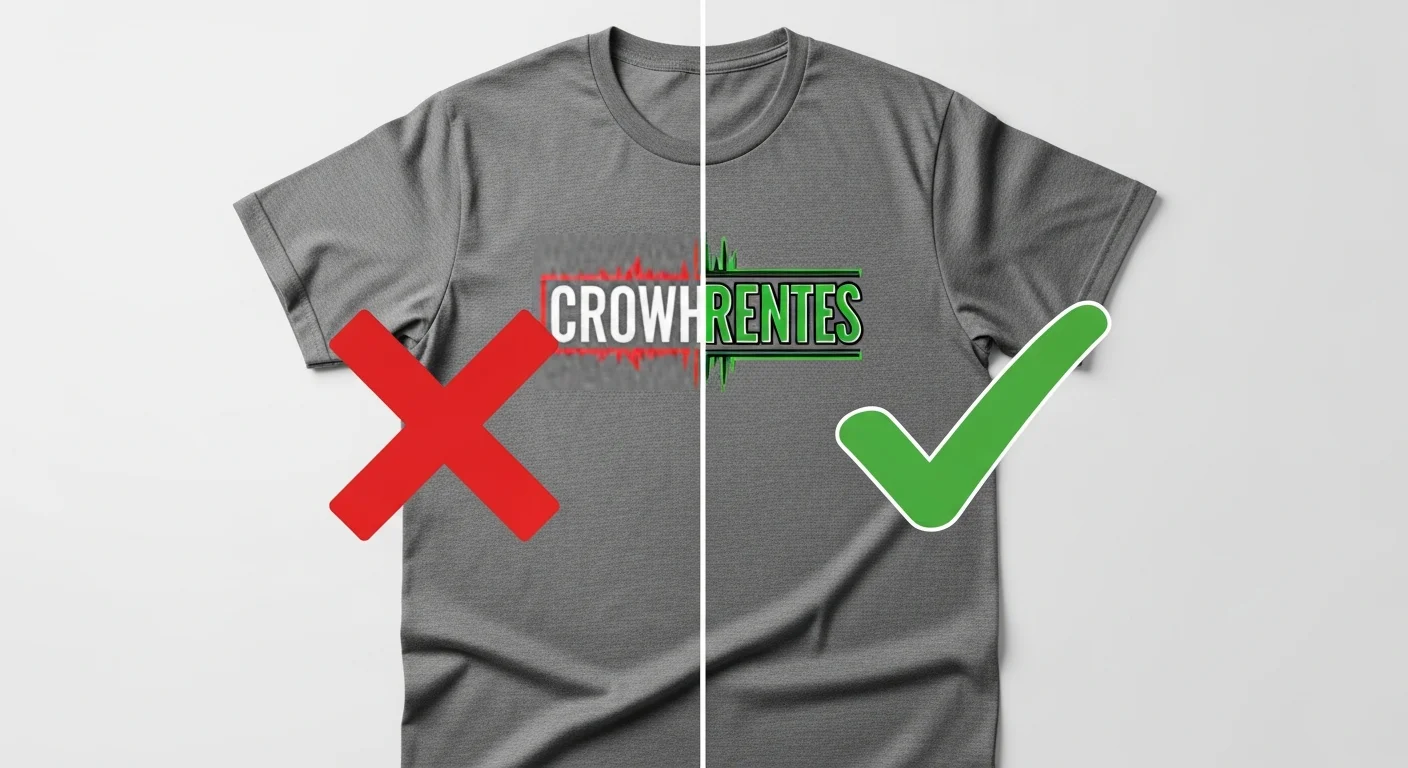
This is the single most common mistake in custom t-shirt ordering, and it is the one that causes the most visible damage to the finished product. A design that looks crisp on your computer screen can print as a blurry, pixelated mess if the file resolution is too low. The minimum resolution for quality t-shirt printing is 300 DPI (dots per inch) at the actual print size. A graphic that is 300 DPI at two inches wide is only 75 DPI when scaled up to eight inches wide, and that difference is dramatic.
The fix is simple: always start with the highest resolution source file available. Vector files (AI, EPS, SVG) are ideal because they can be scaled to any size without losing quality. If you are working with raster images (PNG, JPEG), ensure the file is at least 300 DPI at the final print dimensions. A good rule of thumb is that your image file should be at least 3000 pixels wide for a standard chest print. If you are designing from scratch, our beginner design guide walks you through resolution requirements and file preparation step by step.
Mistake 2: Using the Wrong Color Mode
Digital screens display colors in RGB (red, green, blue), while most printing processes use CMYK (cyan, magenta, yellow, black) or specific Pantone spot colors. If you design your artwork in RGB and send it directly to a screen printer, the printed colors can shift significantly from what you see on your monitor. Bright blues may appear muted, vivid oranges may shift toward red, and fluorescent colors may lose their pop entirely.
For screen printing, convert your design to CMYK or specify Pantone colors to ensure accurate color reproduction. For DTG printing, RGB files are generally acceptable because the printer's software handles the color conversion internally. Regardless of the method, always request a digital proof or physical color sample before approving a full production run, especially for brand-specific colors that need to match exactly.
Mistake 3: Ignoring Print Area Limits
Every printing method and every press has maximum print area dimensions, and designs that extend beyond those boundaries get cropped, scaled down, or rejected entirely. A standard front chest print area is approximately 12 by 14 inches for adult sizes, but this varies by printer and garment size. Designs intended for children's shirts need to be scaled down proportionally.
Before finalizing your design, ask your printer for their specific print area specifications and design within those constraints. If your design requires edge-to-edge coverage, you will need all-over sublimation printing, which has its own set of requirements and costs. Designing within the print area from the start eliminates surprises during production.
Mistake 4: Ordering the Wrong Sizes

Sizing mistakes are expensive because you end up with shirts that nobody can wear. The problem usually stems from one of two issues: either the person ordering guesses at sizes instead of collecting actual measurements, or they assume that sizes are standardized across all brands when they are not. A large in one brand can fit like an extra-large in another.
The solution is to always reference the specific garment's size chart, not a generic sizing guide. Collect size preferences from your group well in advance and add a few extra shirts in the most popular sizes as a buffer. For events where you cannot collect sizes ahead of time, the distribution typically follows a bell curve with medium and large being the most requested. When possible, order a size sample set before committing to a bulk order.
Mistake 5: Not Ordering a Sample First
Skipping the sample step is a gamble that experienced buyers rarely take. A sample lets you evaluate the print quality, color accuracy, fabric feel, and overall appearance before committing to a full order. It costs a few extra dollars and a few extra days, but it can save you from hundreds or thousands of dollars in mistakes.
This is especially important for first-time orders with a new printer, complex multi-color designs, specific color matching requirements, or large bulk orders where a mistake is multiplied across hundreds of units. Request a printed sample on the exact blank garment you plan to use for the full order to get the most accurate preview.
Mistake 6: Choosing the Wrong Fabric for the Printing Method
Not every fabric is compatible with every printing method, and pairing the wrong combination leads to prints that crack, fade, or bleed after a few washes. The most common version of this mistake is attempting to sublimate onto cotton, which simply does not work because sublimation ink only bonds with polyester fibers. Another frequent error is using plastisol screen printing ink on polyester, which can cause dye migration where the garment's dye bleeds through the print over time.
Before you choose your blank, confirm that it is compatible with your selected printing method. If you are unsure which method best suits your project, our screen printing vs DTG guide explains the differences and fabric requirements for each approach. Getting this combination right from the start prevents the most frustrating type of custom shirt failure.
Mistake 7: Too Many Colors for Screen Printing
Screen printing requires a separate screen for each color in the design. Every additional color increases setup time, material costs, and production complexity. A twelve-color photographic design that would print beautifully with DTG becomes prohibitively expensive with screen printing because each color requires its own screen, ink mix, and print pass.
If you are choosing screen printing for a large order, design with color efficiency in mind. Limit your design to one to four spot colors for the most cost-effective results. If your design requires photographic detail or unlimited colors, DTG or DTF printing may be more appropriate and cost-effective methods for your specific project.
Mistake 8: Copyright and Trademark Issues
Using copyrighted images, logos, phrases, or characters on custom t-shirts without proper licensing is both illegal and increasingly enforced. Sports team logos, movie characters, song lyrics, brand logos, and even certain fonts can be protected by copyright or trademark law. Printing copyrighted material exposes you to legal action and can result in your order being cancelled and your shirts destroyed.
Always use original artwork, properly licensed assets, or creative commons material. If you want to reference a pop culture concept, create an original design that is inspired by the idea without directly copying protected elements. When in doubt, consult with an intellectual property attorney before printing. Use our free design tool which provides access to safe-to-use graphics, fonts, and templates.
Mistake 9: Waiting Too Long to Order
Rush orders are stressful, expensive, and risky. Standard production timelines for custom t-shirts range from five to ten business days, depending on the printing method and order size. Shipping adds additional time. If you are ordering for a specific event or deadline, working backward from your need-by date and adding a buffer for unexpected delays is essential.
For events, we recommend placing your order at least three to four weeks before the date. For large orders of a hundred units or more, six to eight weeks is safer. Corporate orders, school spirit wear, and nonprofit campaigns should build even more lead time into their planning to accommodate approval processes, size collection, and design revisions. Procrastination is one of the most expensive custom t-shirt mistakes because rush fees can add 25 to 50 percent to your total cost.
Mistake 10: Not Proofreading Text
Typos on custom t-shirts are permanent. Once the shirts are printed, there is no spell-check, no undo button, and no way to correct the error without reprinting the entire order at your expense. The most common text errors include misspelled names, wrong dates, missing words, and incorrect phone numbers or website URLs.
Build a proofreading step into your approval process. Have at least two people review the final design file before it goes to print. Read the text backward to catch spelling errors that your brain might autocorrect when reading forward. Double-check every number, date, name, and URL character by character. This two-minute step saves hours of regret and hundreds of dollars in reprinting costs. For ongoing care and maintenance of your finished shirts, our care and washing guide ensures your investment lasts.
Frequently Asked Questions
What resolution should my artwork be for custom t-shirt printing?
Your artwork should be at least 300 DPI at the actual print size. For a standard chest print of about 12 by 12 inches, that means your image file should be approximately 3600 by 3600 pixels. Vector files in AI, EPS, or SVG format are ideal because they can be scaled to any size without losing quality. Avoid using images downloaded from the web, as they are typically 72 DPI and will print as blurry and pixelated.
How far in advance should I order custom t-shirts for an event?
For most events, order at least three to four weeks before your need-by date. For large orders over one hundred units, allow six to eight weeks. These timelines account for design approval, production, shipping, and a buffer for any unexpected delays. Rush orders are available from most printers but come with premium fees that can increase your total cost by 25 to 50 percent.
Can I use any image I find online for my custom t-shirt design?
No. Images found online are typically copyrighted and cannot be legally reproduced on merchandise without the copyright holder's permission. Using copyrighted images, logos, characters, or phrases exposes you to legal liability. Always use original artwork, properly licensed stock assets, or creative commons images with appropriate attribution. When in doubt, create something original.
Why do my custom t-shirt colors look different from my screen?
Computer screens display colors using RGB light, while printing uses CMYK inks or specific spot colors. This fundamental difference means that some colors, especially bright neons and deep blues, cannot be exactly replicated in print. To minimize color surprises, convert your design to CMYK before sending it to print, request a color proof, and understand that slight variations between screen and print are normal in all printing processes.
Should I order a sample before placing a bulk custom t-shirt order?
Yes, always. A sample costs a few extra dollars and a few extra days but gives you the opportunity to evaluate print quality, color accuracy, fabric feel, and garment fit before committing to a full production run. This is especially important for first-time orders, brand-specific color matching, and large bulk orders where a mistake is multiplied across hundreds of units.
Share this article
Written by
Marcus Chen
E-Commerce Growth & Merchandising Lead at RareCustom. MBA from Wharton, former Shopify strategist. Marcus has helped 200+ merchants launch custom merchandise lines and specializes in business strategy, bulk ordering, and fundraising programs.